close-button
  • Keyboard Tools
  • Mouse Tools
  • Typing Tools
  • Test Tools
  • Free 2-minute typing test

    Improve your speed with a two-minute typing test.

    120
    seconds
    0
    words/min
    0
    chars/min
    100
    % accuracy
    0
    mistakes
    Click here or start typing…
    Test Complete!
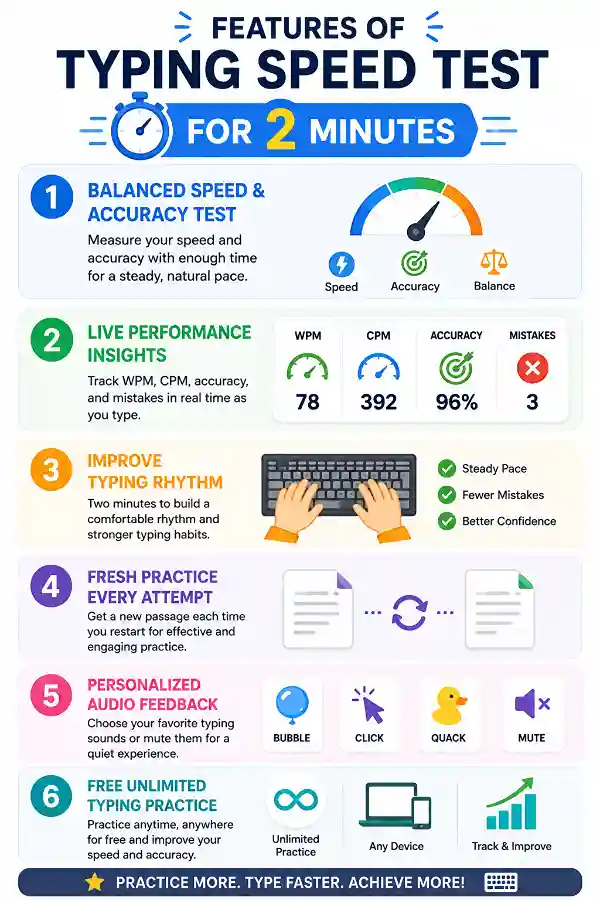
    Balanced Speed & Accuracy Test

    Balanced Speed & Accuracy Test

    The 2-minute typing test gives you enough time to measure both typing speed and accuracy together. Unlike shorter tests, it encourages a steady typing rhythm instead of rushing through every word. This makes it ideal for evaluating your overall typing performance.

    Live Performance Insights

    Live Performance Insights

    Monitor your Words Per Minute (WPM), Characters Per Minute (CPM), typing accuracy, and mistakes throughout the session. Watching these metrics update in real time helps you understand how your typing changes as you continue. Every keystroke contributes to an accurate performance overview.

    Improve Typing Rhythm

    Improve Typing Rhythm

    A two-minute session allows you to settle into a comfortable typing pace without feeling pressured. Practicing a consistent rhythm helps reduce unnecessary mistakes and builds better keyboard confidence. It's an excellent way to develop smoother typing habits.

    Fresh Practice Every Attempt

    Fresh Practice Every Attempt

    Restart the test whenever you like to receive a new typing passage. Different paragraphs expose you to new words, punctuation, and sentence structures, making each practice session more effective. This keeps your learning experience varied and engaging.

    Personalized Audio Feedback

    Personalized Audio Feedback

    Choose from Bubble, Click, Quack, and other available typing sounds, or mute them completely. Whether you prefer audible feedback or a silent environment, you can customize the typing experience to match your preference. Practice comfortably with the settings you enjoy.

    Free Unlimited Typing Practice

    Free Unlimited Typing Practice

    Take the 2-minute typing test as many times as you like without restrictions. Practice on any device with a compatible web browser and keyboard, compare your results, and steadily improve your typing speed and accuracy wherever you choose.

    idea

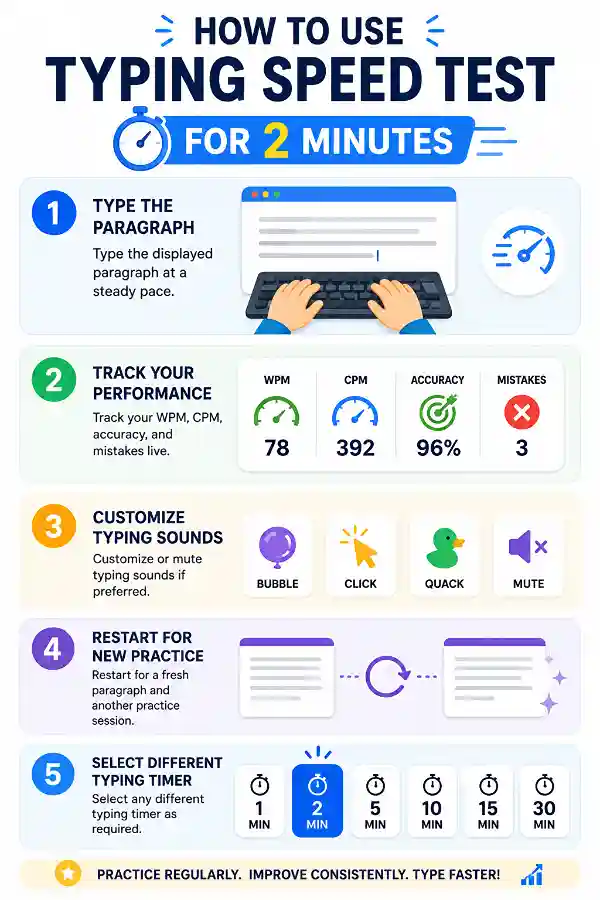
    Steps to Use the Typing Speed Test for 2 Minutes

    1 . Type the displayed paragraph at a steady pace.
    2 . Track your WPM, CPM, accuracy, and mistakes live.
    3 . Customize or mute typing sounds if preferred.
    4 . Restart for a fresh paragraph and another practice session.
    5 . Select any different typing timer as required.

    Other useful information

    Explore our visual guides and infographics
    ×
    Infographic Preview

    Frequently Asked Questions


    Why should I choose a 2-minute typing test?

    A 2-minute typing test provides a better balance between speed and accuracy than very short typing sessions. It allows you to settle into a natural typing rhythm while still delivering quick results. Many users find it ideal for everyday practice.

    Is a 2-minute typing test more reliable than a 1-minute test?

    For many users, yes. An extra minute gives you more time to demonstrate consistent typing performance instead of relying only on your initial typing speed. It often produces a more balanced assessment.

    What typing metrics are displayed?

    The tool shows live Words Per Minute (WPM), Characters Per Minute (CPM), typing accuracy, and total mistakes. These statistics update continuously as you type.

    Why is typing rhythm important?

    A steady typing rhythm helps reduce unnecessary pauses and mistakes. Developing consistent finger movement often leads to smoother and faster typing over time.

    Does accuracy matter more than speed?

    Yes. Accurate typing reduces the need for corrections and usually leads to faster typing naturally with regular practice. Building good habits early produces better long-term results.

    Why do I slow down halfway through the test?

    Many users begin quickly and then adjust to a comfortable pace. This is normal and can help improve overall accuracy. Regular practice gradually increases both confidence and consistency.

    Is the 2-minute test good for beginners?

    Absolutely. The duration is long enough to build confidence without feeling overwhelming. It encourages steady progress through regular practice.

    What if my WPM is lower than expected?

    Typing speed varies depending on concentration, familiarity with the text, and typing habits. Focus on gradual improvement instead of comparing yourself with others.

    How often should I practice?

    Practicing a few minutes every day helps improve keyboard familiarity, finger coordination, and typing confidence. Consistency is more important than occasional long sessions.

    Can this test improve my typing rhythm?

    Yes. Repeating balanced practice sessions helps establish a smoother typing pace and reduces hesitation between words.

    Is this test useful for office workers?

    Yes. Office tasks often require both speed and accuracy, making a 2-minute typing test a practical way to improve everyday keyboard performance.

    Can I compare my results over time?

    Yes. Taking the test regularly allows you to observe gradual improvements in speed, accuracy, and overall typing consistency.

    What is the difference between WPM and CPM?

    WPM measures the number of words typed each minute, while CPM counts every character, including spaces and punctuation. Together, they provide a fuller picture of your typing performance.

    Does the test require downloads?

    No. The typing test runs directly in your browser, allowing you to start practicing immediately without installing software.

    Is two minutes enough to improve typing?

    Yes. Short but consistent practice sessions can significantly improve typing skills over time, especially when combined with good typing habits.

    Why is consistency important?

    Maintaining a steady typing speed throughout the test usually produces better long-term results than typing very fast for only a few seconds. Consistency builds confidence and accuracy.

    My speed is good, but my accuracy keeps dropping. What should I do?

    Slow your typing slightly and concentrate on pressing each key correctly. Once your accuracy improves, your typing speed usually increases naturally through regular practice.

    I slow down after the first minute. Is that common?

    Yes. Many users start quickly and then settle into a more comfortable pace. With consistent practice, you'll find it easier to maintain a steady typing rhythm throughout the full two minutes.

    Should I correct every mistake while typing?

    If you notice an error, correct it if your typing test allows it, but avoid letting corrections interrupt your overall rhythm. Finding the right balance between accuracy and flow helps improve long-term performance.

    Why do gamers measure Actions Per Minute (APM)?

    APM measures how many actions a player can perform within a minute and is commonly used to evaluate input speed in strategy and fast-paced games. Using the APM test helps players understand their action speed and improve their command efficiency. It provides a measurable way to track practice and performance.

    Why would someone need an Enter key counter?

    An Enter Counter helps users measure repeated Enter key presses and check whether the key is responding consistently. Using the tool can be useful for testing keyboards, checking key registration, or measuring repeated inputs during specific tasks. It provides a quick way to verify Enter key activity.

    Over 150k Users Rely on Our Hardware Tester Tools Monthly

    Join a growing community of creators who trust hwtests.com for testing keyboard,mouse,typing and many more


    rating-img

    Rate this tool

    Your feedback helps us improve our services

    3.44/5   16 votes

    About The Author

    Lakshmi Badige

    Lakshmi Badige is a skilled content writer with expertise in creating engaging content for SaaS companies. From blog posts and case studies to website copy, Lakshmi focuses on delivering content that attracts customers, builds trust, and drives results. With experience in SEO and content strategy, ensures every piece of content is optimized for both readers and search engines.

    Contributors