What does a Double Click Test detect?
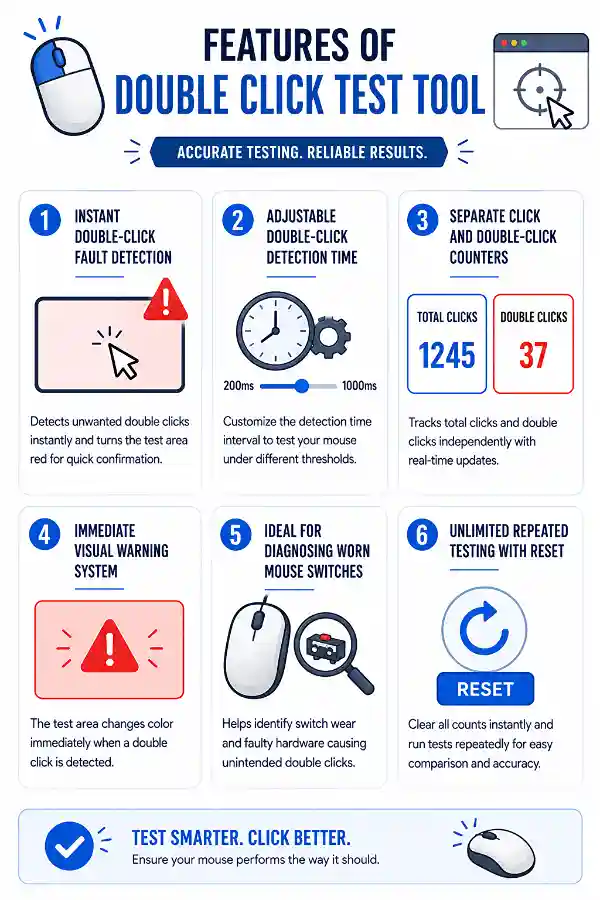
A Double Click Test checks whether your mouse is registering two clicks when you intended to click only once. It helps identify accidental double-click behavior caused by worn switches or other hardware issues. The test displays both total clicks and detected double clicks for easy comparison.
Why is my mouse double-clicking when I click only once?
This usually happens when the mouse switch begins to wear out after prolonged use. Instead of sending one click signal, it may generate two very close together. Running this test helps confirm whether the problem occurs consistently.
What does the red test area mean?
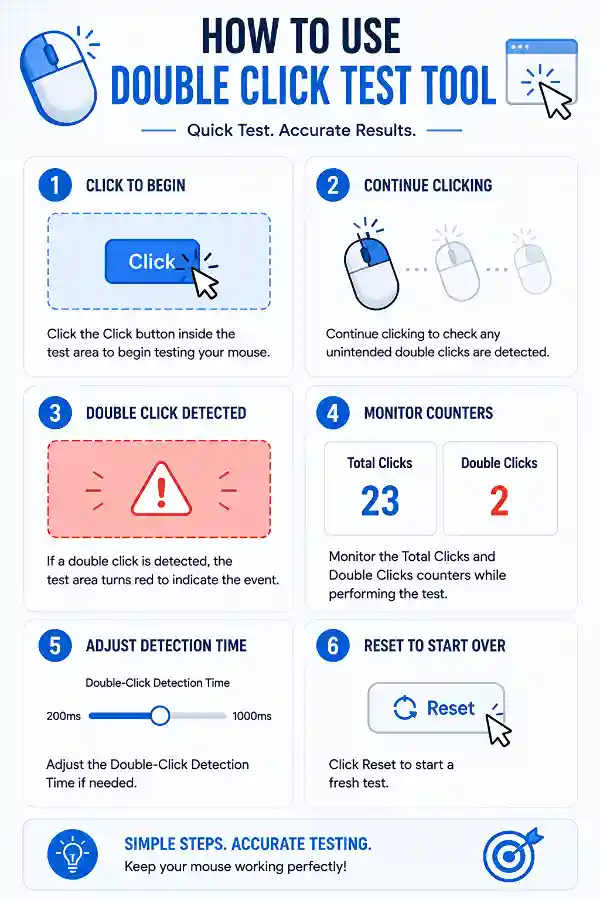
The test area turns red whenever a double click is detected within the selected detection time. This provides immediate visual feedback without needing to watch the counters constantly. It makes unexpected double clicks easier to spot.
Why should I change the double-click detection time?
Different users and operating systems recognize double clicks using different time intervals. Adjusting the detection time allows you to test how your mouse behaves under faster or slower recognition settings. This helps when troubleshooting inconsistent clicking issues.
What is the difference between Click Count and Double Click Count?
The Click Count shows every individual click you perform during the test. The Double Click Count only increases when two clicks occur within the selected detection interval. Comparing both values helps identify unintended double-click events.
Can this tool tell me if my mouse switch is worn out?
It cannot measure switch wear directly, but it can reveal symptoms commonly caused by worn microswitches. Frequent unexpected double-click detections often indicate that the switch may be reaching the end of its lifespan.
My drag-and-drop keeps releasing unexpectedly. Can I test for that here?
Unexpected drag interruptions are sometimes caused by faulty mouse switches. Although this tool focuses on detecting double clicks, repeated testing can help determine whether inconsistent click behavior is contributing to the problem.
Does a higher Double Click Count always mean my mouse is faulty?
Not necessarily. If you intentionally perform fast double clicks, they will be counted normally. The test is most useful when you are clicking naturally and unexpected double clicks appear.
Can I test a wireless mouse with this tool?
Yes. The tester works with wired, wireless, and Bluetooth mice supported by your browser. If double-click issues appear only on one device, the problem may be related to that mouse rather than your computer.
Should I replace my mouse if it fails this test?
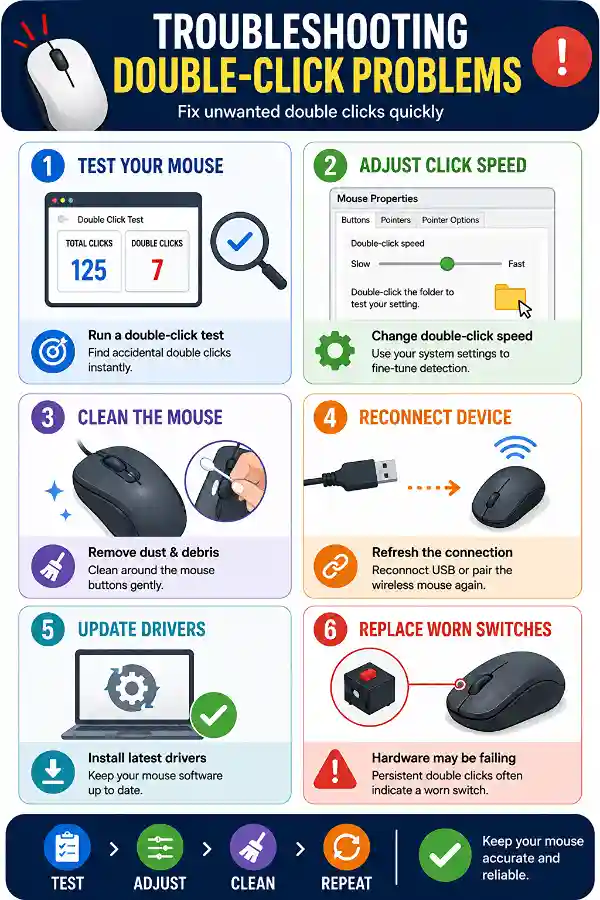
Not immediately. First, repeat the test several times and try adjusting the detection time. If accidental double clicks continue to appear consistently during normal clicking, the mouse switch may need repair or replacement.
Why does my mouse only double-click occasionally?
Intermittent double-clicking is often an early sign of a worn or unstable mouse switch. Performing multiple test sessions increases the chance of detecting inconsistent click behavior.
Can changing the detection time fix my mouse?
No. The detection time only changes how the test recognizes double clicks. It does not repair or modify the actual hardware behavior of your mouse.
Can software cause double-click problems?
In some cases, incorrect mouse settings or third-party mouse software may affect click behavior. If the problem continues across different settings, the issue is more likely related to the mouse hardware.
Why does the double-click count increase even when I'm clicking normally?
If you're clicking at a regular pace and unexpected double clicks are still detected, your mouse may be sending duplicate click signals. Repeating the test several times helps confirm whether the behavior is consistent.
Can this tool detect mouse switch chatter?
Yes. Mouse switch chatter often appears as unwanted double-click events during normal clicking. While the tester doesn't diagnose the exact cause, it helps reveal symptoms commonly associated with switch chatter.
Should I test multiple times before deciding my mouse is faulty?
Yes. A single test may not capture occasional problems. Running several tests with natural clicking provides more reliable results and helps identify intermittent faults.
Does this tool measure clicking speed?
No. This tool is designed to detect double-click events rather than measure clicks per second (CPS). Its primary purpose is diagnosing mouse click accuracy and identifying hardware-related double-click issues.
What should I do if no double clicks are detected but my mouse still behaves strangely?
If the test shows normal results, the issue may be related to your operating system settings, mouse drivers, application-specific behavior, or USB/Bluetooth connection. Testing the mouse on another computer can help determine whether the problem is hardware or software related.
Why do gamers use a Jitter Click Test?
Jitter clicking is a technique used by some gamers to increase clicking speed by creating rapid finger vibrations. Using the
Jitter Click Test helps measure how many clicks per second you can achieve with this technique and compare your performance with regular clicking. It is useful for players who want to understand their clicking speed and mouse response during fast inputs.
How can a Click Counter help test my mouse?
A
Click Counter allows you to check whether your mouse clicks are being detected correctly and count the number of registered clicks. By using the tool, you can verify mouse button responsiveness and identify missed or inconsistent clicks. It is useful when testing a new mouse or troubleshooting clicking problems.